Privacy
In short: we store an encrypted token, you hold the key, and Mcp4Lms only lets Claude read.
Encryption and access
Your LMS token is what lets Mcp4Lms read your courses. Here is where it goes and who can see it.
When you connect
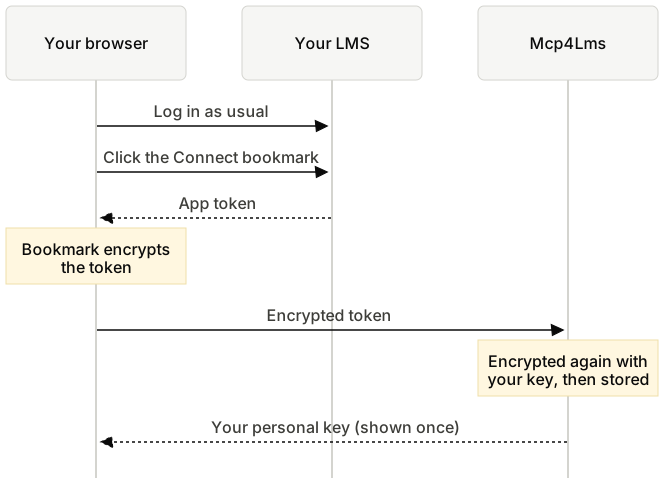
- You log in on your LMS as usual. We never see your password.
- The Connect bookmark gets an app token from your LMS and encrypts it before sending it to us. Only our server can open it.
- Our server encrypts the token again with your personal key and stores only that. We don't keep your key, so we can't open the stored token without you.
When Claude asks a question
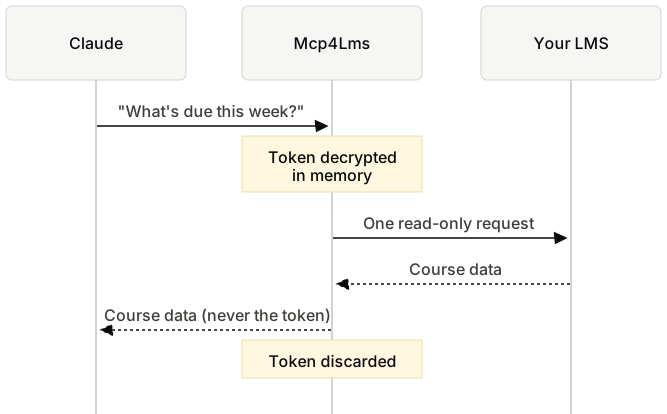
- Claude sends the question to Mcp4Lms.
- Mcp4Lms decrypts your token in memory, makes one read-only request to your LMS, and forgets the token again.
- Claude gets the course data back. It never receives the token.
| Who | Can read it? |
|---|---|
| You, with your personal keyThe key is shown once and never stored. | Yes |
| Mcp4Lms, while storedThe database holds only the encrypted token. | No |
| Mcp4Lms, during a requestDecrypted for one request, then discarded. | In memory only |
| ClaudeClaude receives course data, never the token. | No |
| Your LMSYou can end it there by logging out of all devices. | Issued it |
Technical details
- Connect: the bookmark encrypts the token with the server's RSA-OAEP public key, so it never appears in plain text in a URL, your browser history or the console.
- Storage: the token is encrypted with AES-256-GCM under a key derived (HKDF) from your personal key. Only a verifier of the key is stored, never the key.
- Use: when you connect an app, the token is placed in that app's connection, encrypted again with the app's own access token. Each request decrypts it in memory for a single read-only LMS call.
What we store
- An account id, your LMS user id and the date you connected.
- Your LMS app token, encrypted with your personal key. We don't keep the key, so we can't decrypt the token ourselves.
- A connection record for each app you connect (such as Claude). Your token is copied into that record, encrypted again with the app's own access token, so it can only be decrypted when that app makes a request.
We don't store your name, email, password, course content or grades. Course data passes through our server to Claude only when Claude requests it, and is never saved or logged.
What we never see
Your LMS or Microsoft password. You log in to your LMS on its own site, in your own browser. The Connect bookmark only asks the LMS for an app token, the same kind the official Moodle app uses, and encrypts it before sending it to us.
What Claude can do
Read your courses, course contents, deadlines, assignments and submission status, grades, announcements, and the text of course files (PDF, Word, PowerPoint, plain text). Mcp4Lms allows only a fixed set of read-only LMS functions. Claude cannot submit assignments, post, send messages or change anything.
What the LMS token itself can do
It's the same kind of token the official Moodle app uses, so technically it can do anything you can do in that app, such as submitting assignments or sending messages. Mcp4Lms only ever uses it for a fixed set of read-only calls. Deleting your data here, or letting it expire, doesn't revoke it on your LMS.
To revoke it, open Security keys on your LMS and reset the key for the Moodle mobile service. This may sign you out of the Moodle app.
What you should know
- When the AI reads a course file, its contents pass through our server to the AI tool once, and are never stored or logged.
- Links outside the LMS are opened only after you confirm them in the conversation, and never with your LMS credentials.
- Your key and your token give access to your LMS data. Don't share your key with anyone.
- While Claude is using Mcp4Lms, our server handles your token in memory only. At that point you are trusting that the server runs the published open-source code.
- When your connection expires, or you delete it, we delete the encrypted token and remove app access. We don't revoke the app token on the LMS itself; see above for how to revoke it there.
- You can disconnect apps or delete all your data at any time under Account.
Security contact and disclosure
Found a vulnerability? Email security@mcp4lms.com. Include the steps to reproduce it, and don't access other people's data while testing. We aim to acknowledge reports within 3 days and will tell you when the issue is fixed.
For anything else, such as questions, data requests or requests from a university, write to maintainers@mcp4lms.com. The code is public on GitHub; please report security issues by email rather than in a public issue.
Opting out
- Open Account, enter your key, and disconnect individual apps or delete everything. Deletion removes your account, the encrypted token and all app connections immediately.
- Lost your key? Connect again from your LMS. This issues a new key and invalidates the old one, and you can then delete your account from the Account page.
- To also end the app token on your LMS, reset it under Security keys there. This may sign you out of the Moodle app.
- If you do nothing, your data is deleted automatically when the access period you chose expires.
- If you administer an LMS and want it excluded from Mcp4Lms, email maintainers@mcp4lms.com.
Disclaimer
Mcp4Lms is provided free of charge, as is, without warranty of any kind. It is an independent open-source project released under the AGPL-3.0 license. It is not affiliated with, endorsed by or operated by any university, Moodle HQ, Anthropic, OpenAI, Google, Anysphere (Cursor) or any other AI tool vendor.
You use the service at your own risk. You are responsible for keeping your personal key private, for how you use your course data in AI tools, and for complying with your university's rules on account use and academic integrity.
AI tools can misread, omit or summarize information incorrectly. Always verify deadlines, grades and assignment requirements on your LMS before acting on them.
To the extent permitted by law, the people running this service are not liable for any damages, missed deadlines, lost data, grading outcomes or account problems arising from its use. The service may change or stop at any time without notice.